
Gitbook Plugin Anchor Navigation Ex
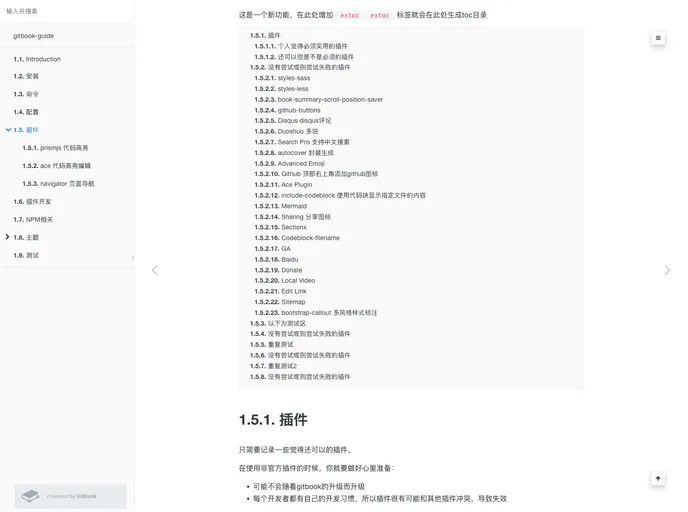
Supports two navigation mode, title, anchor effect is the default theme, style, follow the website
Overview
The gitbook-plugin-anchor-navigation-ex is a plugin for GitBook that enhances the navigation experience for users. It provides features such as adding anchor effects to headings, floating navigation, top navigation, customizing icons, generating table of contents, and more. This plugin is no longer being updated and the developers recommend using vuepress for building notes.
Features
- Anchor effects for headings (H1-H6)
- Floating navigation mode
- Top navigation mode
- Customization of hierarchy icons for H1-H3 headings
- Compatibility with the default theme and its three styles: White, Sepia, and Night
- Table of contents generation using the
<extoc></extoc>tag - Ability to disable floating navigation using the
<!-- ex_nonav -->tag - Progress logging for troubleshooting using the
config.printLog=truesetting - Removal of unnecessary numbering for multiple H1 headings using
config.multipleH1=false - Display of "Go to top" button using
config.showGoTop=true(Version 1.0.11+) - Customization of floating navigation icon styles using
config.float.floatIcon(Version 1.0.12+) - Ability to disable hierarchy numbering using the
<!-- ex_nolevel -->tag (Version 1.0.12+)
Summary
The gitbook-plugin-anchor-navigation-ex improves the navigation and user experience in GitBook by providing features such as anchor effects, floating navigation, top navigation, customization options, and table of contents generation. However, it is no longer being actively developed and the developers recommend using vuepress for building notes.