
Stremio Community V5
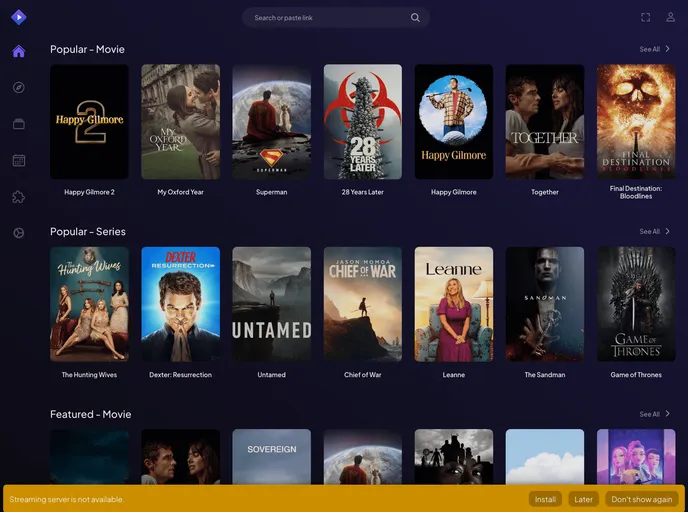
WebView2 and Qt6-based shell, desktop app for Stremio with latest web ui support
Overview
Stremio Desktop v5 brings an exciting new level of flexibility and functionality to media streaming. Whether you're a fan of local files, torrents, or simply looking for a comprehensive solution to enhance your viewing experience, this software has all the bells and whistles. With its recent updates, including user-friendly installation options and expanded support for various enhancements like upscaling and browser extensions, Stremio is truly stepping up its game.
The latest version not only maintains compatibility with existing media formats but also improves performance with innovative features. Users can easily access and enjoy media content while customizing their playback settings effortlessly, making it a worthwhile addition to any media enthusiast's toolkit.
Features
-
Simple Installation: Available as an installer or a portable version, making access easy for both x64 and x86 Windows systems.
-
Mpv Upscalers: Comes with built-in options like Anime4k for enhanced video quality; users can enable different shaders for customizable playback experiences.
-
Extensive Keybindings: A range of shortcuts like CTRL+J for upscaler status and CTRL+E to open AnimeJaNai ConfEditor make navigation a breeze.
-
Nvidia RTX and Intel VSR Support: Graphic-intensive users can leverage advanced scaling techniques through configurable mpv.conf settings.
-
Browser Extension Integration: Easily add custom browser extensions by dragging and dropping unpacked versions into Stremio’s portable_config, enhancing the software's overall functionality.
-
Local File Support: Seamlessly drag and drop local files or torrents for playback, expanding your media library with minimal effort.
-
User-Friendly Configuration: Modifications can be made directly in the application's local directory, giving users flexibility in optimizing their experience.
-
Responsive Performance: Initial model building may cause slight delays, but subsequent playback is smooth, thanks to the well-optimized backend.