
Myndi
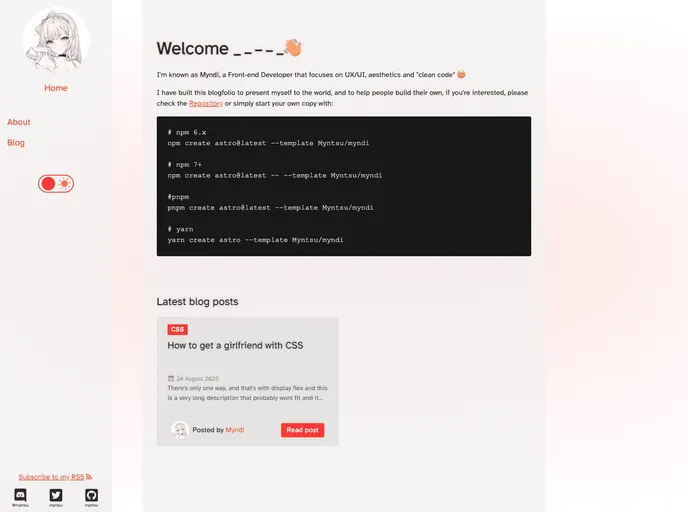


Astro Portfolio & Blog
Overview:
The Astro Portfolio & Blog is a website that is currently under development. It offers a vanguardist layout with simple colors and an intuitive design. The website is responsive and mobile-friendly, with an accessible and hyperlegible font. It supports type-safe Markdown and has a super-fast loading time. It also includes features such as draft posts, pagination, related posts, categories, author information, a sitemap, and an RSS feed. The website follows mostly best practices and is customizable. However, it lacks features such as fuzzy search and may be considered dull for some users.
Features:
- Vanguardist layout
- Simple colors, intuitive design
- Responsive
- Mobile Friendly
- Accessible, hyperlegible font
- Type-safe Markdown
- Super fast loading
- Draft posts, pagination, related posts, categories, author
- Sitemap & RSS
- Mostly best practices
- Customizable
- Fuzzy search (missing)
- Boring portfolio/blog design (missing)
Dependencies:
The Astro Portfolio & Blog theme requires the following dependencies:
- SaSS and SCSS
- Astro ImageSharp
- Astro Sitemap
- Astro Icon
- Astro RSS
SaSS and SCSS quick setup:
To quickly set up SaSS and SCSS, follow these steps:
- Install SaSS.
- Usage instructions for SaSS and SCSS.
Astro Image & Sharp quick setup:
To quickly set up Astro Image & Sharp, follow these steps:
- Install Astro ImageSharp.
- Update astro.config.* to add the necessary configurations.
- Add the required code in astro.config.* and <head>.
- Add the necessary code in robots.txt.
Astro Sitemap quick setup:
To quickly set up Astro Sitemap, follow these steps:
- Install Astro Sitemap.
- Add the required code in astro.config.*.
- Update astro.config.* to include the necessary configurations.
- Add the necessary code in <head>.
- Add the necessary code in robots.txt.
Astro Icon quick setup:
To quickly set up Astro Icon, follow these steps:
- Install Astro Icon.
- Usage instructions for Astro Icon.
Astro RSS quick setup:
To quickly set up Astro RSS, follow these steps:
- Install Astro RSS.
- Create a file named rss.xml.js at the root of /pages.
- Add the required code in rss.xml.js.
- Create a styles.xsl file at /public/rss.
Summary:
The Astro Portfolio & Blog is a website theme that offers a vanguardist layout with simple colors and an intuitive design. It is responsive, mobile-friendly, and uses an accessible and hyperlegible font. The theme supports type-safe Markdown and has a super-fast loading time. It includes features such as draft posts, pagination, related posts, categories, author information, a sitemap, and an RSS feed. Users can customize the theme to suit their preferences. However, it lacks features like fuzzy search and may not be visually appealing for everyone.
- Astro
Astro is the all-in-one web framework designed for speed. Pull your content from anywhere and deploy everywhere, all powered by your favorite UI components and libraries.
- SCSS
SCSS is a preprocessor scripting language that extends the capabilities of CSS by adding features such as variables, nesting, and mixins. It allows developers to write more efficient and maintainable CSS code, and helps to streamline the development process by reducing repetition and increasing reusability.
- Blog

Blog websites feature posts written by one or more authors, organized by categories and tags, with a section for comments and archives sorted by date or topic. Additional features may include search bar, social media sharing, subscription or RSS feed, about and contact pages, and visual content.
- Portfolio

A portfolio website is a type of website that showcases an individual's or a company's work, skills, and accomplishments. It typically includes a gallery of images or videos, case studies, and client testimonials to provide potential clients or employers with a comprehensive overview of their experience and expertise.
- Templates & Themes

A template or theme refers to a pre-designed layout or structure that provides a basic framework for building a specific type of application or website. It typically includes good design, placeholder content and functional features, allowing developers to customize and fill in the details according to their specific needs.