
Css In Js
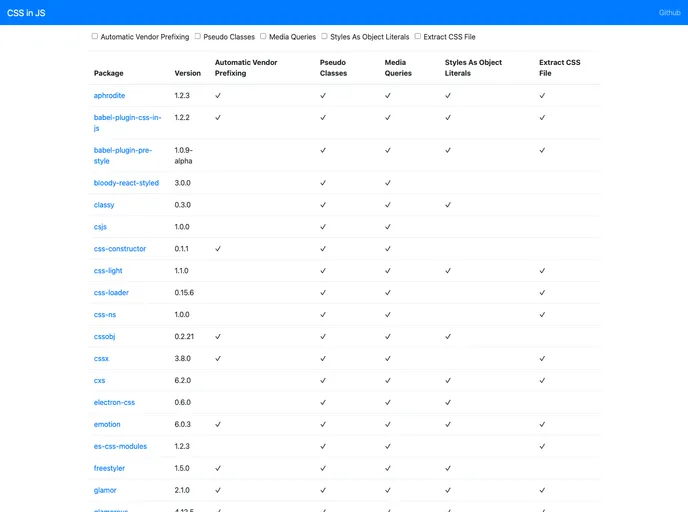
React: CSS in JS techniques comparison
Overview
If you're diving into the world of CSS in JavaScript (CSS-in-JS), you might be overwhelmed by the number of options available. Each package comes with its own unique features and trade-offs, making it essential to understand which one aligns best with your project needs. After examining several popular options, it becomes clear that your choice will depend on functionality and ease of integration.
From automatic vendor prefixing to the ability to extract CSS files, the landscape of CSS-in-JS libraries offers diverse capabilities. Whether you prefer managing styles as object literals or require support for pseudo classes and media queries, there’s a tailored solution for every developer.
Features
- Automatic Vendor Prefixing: Many packages support automatic vendor prefixing, ensuring your styles work across different browsers without extra effort.
- Pseudo Classes Support: Most libraries include support for common CSS pseudo classes, enhancing your styles with minimal configuration.
- Media Queries: Effective handling of media queries allows developers to create responsive designs that adapt to various screen sizes.
- Styles As Object Literals: This approach lets you manage styles directly within your JavaScript files, promoting a streamlined coding experience.
- Extract CSS File: Some libraries enable extraction of CSS files at build time, which can help optimize the performance of your applications.
- Package Stats: Each library comes with usage stats that can help you gauge popularity and community support, informing your decision process.
- Version Compatibility: Most packages provide compatibility details, so you can ensure seamless integration with your existing setup.
- Performance Metrics: Analytics show how each library performs, such as load times and the capability to handle complex styling scenarios.