Canva UI Template
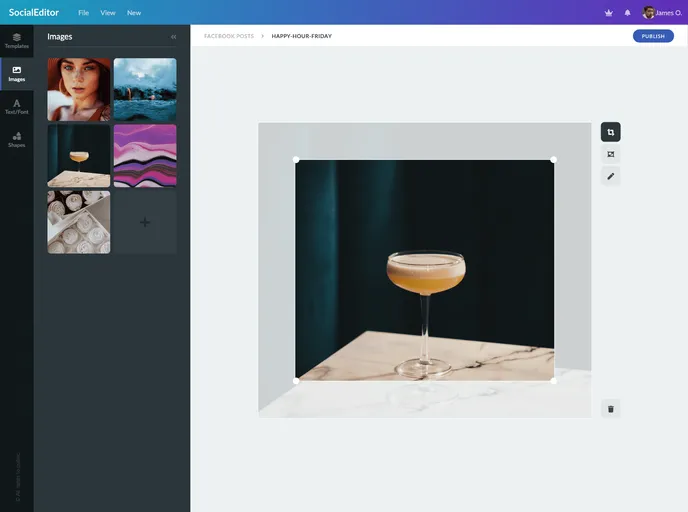
Online Editor UI template, like canva designed purely using CSS and HTML.
Overview
The Canva UI Template is an online editor UI template that is designed purely using CSS and HTML. It aims to provide a user-friendly interface similar to that of Canva, a popular graphics designing tool. The template allows users to create and customize various types of visual content, such as images, infographics, and social media posts.
Features
- User-friendly interface: The template offers an intuitive and easy-to-navigate user interface, allowing users to quickly understand and access the different tools and features.
- Drag-and-drop functionality: Users can easily drag and drop elements onto the canvas, making it simple to arrange and design their visual content.
- Customization options: The template provides a wide range of customization options, including the ability to resize, rotate, and modify the properties of the elements.
- Collaboration tools: Users can invite others to collaborate on their projects, allowing for seamless teamwork and real-time editing.
- Pre-built templates: The template offers a collection of pre-built templates that users can choose from, making it easier to start their projects or get inspiration.
- Undo/Redo functionality: Users can undo or redo their actions, ensuring that any mistakes or unwanted changes can be easily rectified.
- Export options: The template allows users to export their completed projects in various formats, such as PNG, JPG, or PDF.
- Responsive design: The UI template is built with a responsive design, ensuring that it adapts well to different screen sizes and devices.
Summary
The Canva UI Template is a CSS and HTML-based online editor UI template that offers a user-friendly interface for creating and customizing visual content. With features such as drag-and-drop functionality, collaboration tools, and a range of customization options, users can easily design professional-looking graphics. The template also provides pre-built templates, undo/redo functionality, export options, and a responsive design, making it a versatile choice for various design projects.