
Iconic Resume
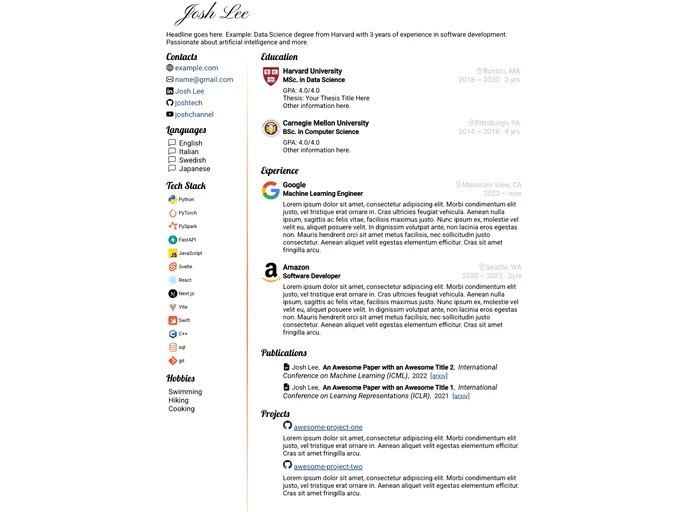


Resume template with logos and icons, in Jekyll.
Overview
Iconic Resume is a resume template written in the Jekyll framework that provides a LinkedIn-style layout for creating professional resumes. It offers a two-column A4 design with company logos and icons to enhance visualization. Users can also add links to their social media profiles, code repositories, papers, projects, and more. The template is lightweight, easy to install, and customizable.
Features
- Two-column A4 layout: The template offers a clean and organized two-column layout that is optimized for A4 paper size.
- Company logos and icons: Users can showcase their previous work experience and affiliations by including company logos and icons.
- Social media and code repo links: It allows users to add links to their social media profiles, code repositories, papers, projects, and other relevant resources.
- Separation of contents with formats: All the contents are placed in a separate configuration file (_config.yml), allowing easy customization and formatting.
- Lightweight: The template is designed to be lightweight, ensuring fast loading times and efficient performance.
Installation without Ruby and Jekyll
- Fork the repository.
- Create a gh-pages branch.
- Edit the _config.yml file in the gh-pages branch.
- Uncomment baseurl: '/iconic-resume'.
- Replace the dummy data with your own career details.
- Add your own logos to the imgs folder.
- Go to the Settings -> Pages page on GitHub, and select gh-pages as the GitHub Pages source.
- Wait for a few moments until the Settings -> Pages page shows that "Your site is live at https://username.github.io/iconic-resume/", where username is your GitHub username.
- Visit the provided address and right-click the page to save your resume in PDF.
- Whenever you make changes to _config.yml or any other files, commit the changes to trigger a GitHub Action that will re-build the page. Wait for it to finish before refreshing the https://username.github.io/iconic-resume/ link. The build progress can be viewed under the "Actions" tab on your forked repository.
Local Installation
- Install Ruby.
- Install Jekyll.
- Clone or download the repository to your local machine.
- Edit the _config.yml file, replacing the dummy data with your own career details.
- Put your own icons in the imgs folder.
- Open the command prompt and navigate to the repository's directory.
- Run the command "bundle exec jekyll serve".
- Open localhost:4000 in your browser.
- Right-click the page and click "print..." to save your resume in PDF.
Summary
Iconic Resume is a Jekyll-based resume template that offers a LinkedIn-style layout for creating professional resumes. It provides features such as a two-column A4 layout, company logos and icons, social media and code repo links, separation of contents with formats, and lightweight design. The template can be installed with or without Ruby and Jekyll, making it accessible to users with different technical backgrounds. It offers easy customization and allows users to generate their resume as a PDF file. Contributions and feedback are welcome through the GitHub repository.
- Jekyll
Jekyll is a static site generator written in Ruby that allows you to create simple, fast, and secure websites without the need for a database.
- SCSS
SCSS is a preprocessor scripting language that extends the capabilities of CSS by adding features such as variables, nesting, and mixins. It allows developers to write more efficient and maintainable CSS code, and helps to streamline the development process by reducing repetition and increasing reusability.
- Personal

A personal website is an online platform that showcases an individual's work, interests, and personality. It can include a range of content, such as a bio, resume, portfolio, blog, and contact information, and is often used to promote one's personal brand or professional services.
- Templates & Themes

A template or theme refers to a pre-designed layout or structure that provides a basic framework for building a specific type of application or website. It typically includes good design, placeholder content and functional features, allowing developers to customize and fill in the details according to their specific needs.
- GitHub Pages

Gridsome is a Vue.js-based static site generator that makes it easy to build fast and flexible websites and applications by leveraging modern web technologies like GraphQL, Webpack, and hot reloading