
React Terminal UI
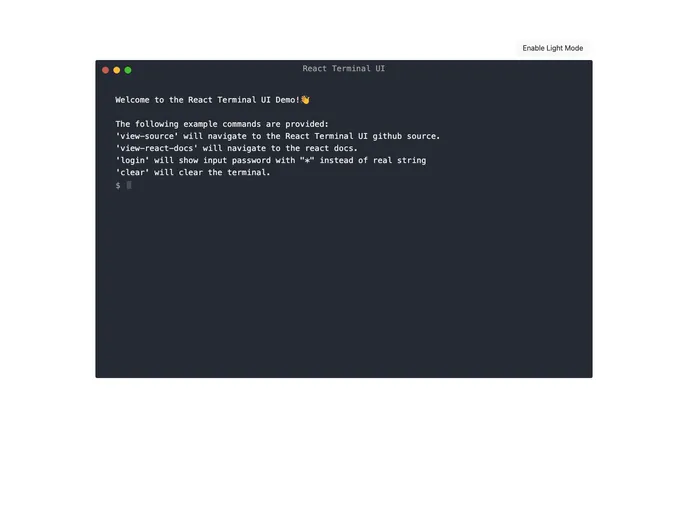

A terminal React component with support for light and dark modes.
Overview
The React Terminal UI is a versatile terminal component designed for use in React applications. With the ability to support both light and dark themes, it caters to different user preferences and enhances the overall aesthetic of your application. This component is not only visually appealing but also highly customizable, making it an invaluable tool for developers looking to integrate terminal-like functionality seamlessly.
This component operates as a "dumb component," meaning it renders whatever props are passed to it without managing internal state. This flexibility allows developers to create a unique controller component to handle the terminal's state, enabling more complex interactions and functionality.
Features
-
Customizable Name: Display any desired name at the top of the terminal, allowing personalization per the application’s theme.
-
Light and Dark Modes: Switch easily between light and dark color modes to match user preferences or application design.
-
Input Handling: An optional
onInputcallback function lets developers capture user input when the Enter key is pressed, enhancing interactivity. -
Dynamic Starting Input: Set a starting input value that can change dynamically, making it easy to reset or pre-fill the user's input.
-
Custom Prompt Character: Change the prompt character from the default
$to something else, tailoring the terminal experience to fit the application context. -
Adjustable Height: Configure the terminal height easily, with a default setting of 600px, ensuring it fits well within the application's layout.
-
Callback Functions for Interactions: Provide optional callback functions for the red and yellow buttons, enabling custom actions when these buttons are clicked.
- React
React is a widely used JavaScript library for building user interfaces and single-page applications. It follows a component-based architecture and uses a virtual DOM to efficiently update and render UI components
- Dark Mode
Dark mode is a user interface option that uses a dark color scheme instead of light. It reduces eye strain and improves visibility in low-light conditions. Implementing dark mode in a website or application involves updating the styles and color palette to support both light and dark modes.
- Eslint

ESLint is a linter for JavaScript that analyzes code to detect and report on potential problems and errors, as well as enforce consistent code style and best practices, helping developers to write cleaner, more maintainable code.
- Typescript

TypeScript is a superset of JavaScript, providing optional static typing, classes, interfaces, and other features that help developers write more maintainable and scalable code. TypeScript's static typing system can catch errors at compile-time, making it easier to build and maintain large applications.