
Vue Numeric Input
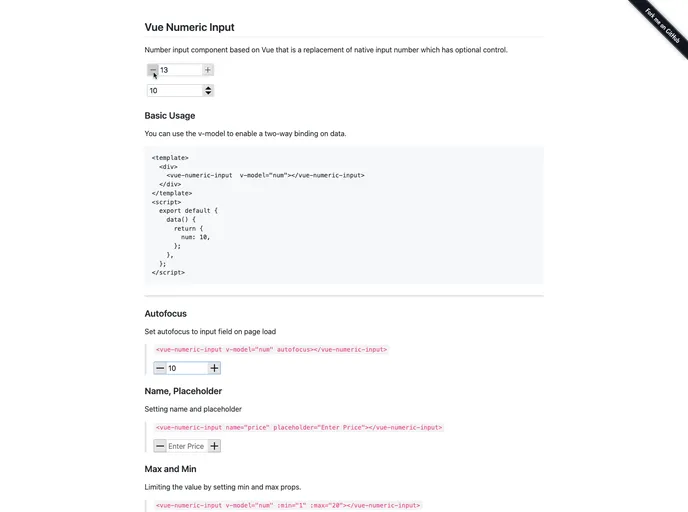


Number input component with controls
Overview
Vue Numeric Input is an innovative Vue component that enhances the native input number functionality, offering users a more versatile and customizable tool for managing numerical inputs in their applications. Its design caters to developers looking for finer control over user input in Vue.js applications, making it an invaluable asset for creating responsive and user-friendly interfaces.
The component not only allows for basic numeric input but also includes several customizable properties and events, helping developers tailor the experience to their specific requirements. Whether you need to set a range for accepted values or control the display and alignment of numbers, Vue Numeric Input covers all the bases.
Features
- Customizable Properties: Set attributes like
min,max,step, andprecisionto define the acceptable input range and control increments. - Styling Options: Modify the
width,size, andclassNameproperties to integrate the input seamlessly into your design. - Alignment Flexibility: Control how the numeric value is aligned with the
alignproperty, offering options for left, center, or right alignment. - Responsive Controls: Toggle the visibility of increment/decrement controls with the
controlsproperty, and choose between different control types withcontrolsType. - Keyboard Input Management: Use
isinputto enable or disable keyboard inputs, enhancing control over user interaction. - Mouse Wheel Support: Enable a more intuitive user experience by allowing adjustments via mouse wheel events with the
mousewheelproperty. - Event Handling: Respond to user interactions easily with events like
input,change,focus, andblur, providing developers with the tools to create dynamic interfaces. - Autofocus Capabilities: Set
autofocusto true for automatic focus on page load, ensuring smoother user engagement right from the start.
- Vue
Vue.js is a lightweight and flexible JavaScript framework that allows developers to easily build dynamic and reactive user interfaces. Its intuitive syntax, modular architecture, and focus on performance make it a popular choice for modern web development.
- SCSS
SCSS is a preprocessor scripting language that extends the capabilities of CSS by adding features such as variables, nesting, and mixins. It allows developers to write more efficient and maintainable CSS code, and helps to streamline the development process by reducing repetition and increasing reusability.
- Eslint

ESLint is a linter for JavaScript that analyzes code to detect and report on potential problems and errors, as well as enforce consistent code style and best practices, helping developers to write cleaner, more maintainable code.