Blog
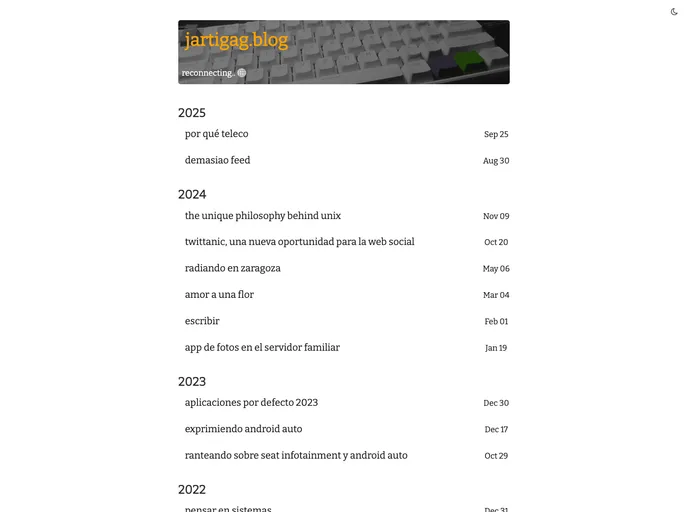
jartigag's posts with jekyll theme "arreando" blog:
Overview:
The arreando theme is a clean and minimalist theme for Jekyll. It is inspired by the Moving theme and provides additional features such as replies to posts on Twitter/Mastodon, related posts, tags, and a theme-switcher. The theme can be easily activated or deactivated as needed.
Features:
- Replies to posts on Twitter/Mastodon
- Related posts
- Tags
- Theme-switcher
New Blog:
- Clone the arreando repository.
- Move into the directory.
- Install the required gems using bundle.
- Run the blog in localhost.
Add Arreando to an Existing Blog:
- To-do: Publish the gem to make this work.
- Add the following line to the Jekyll site's Gemfile:
gem 'arreando'
- Add the following line to the Jekyll site's _config.yml:
theme: arreando
- Execute the command:
bundle install
- Or install the theme manually as:
gem install arreando
- Deploy to Github Pages: Change theme: xxx in _config.yml to remote_theme: jartigag/arreando, then push to your github repo. This is important to avoid getting an error from Github Pages that does not support the arreando theme. If you want to test your site locally, you can change it to theme: arreando and build again.
Summary:
The arreando theme is a clean and minimalist Jekyll theme with additional features such as replies to posts on Twitter/Mastodon, related posts, tags, and a theme-switcher. It can be easily installed in a new or existing blog and offers customization options through the _config.yml file. The theme is open source and available under the MIT License.