Ecommerce_dashboard
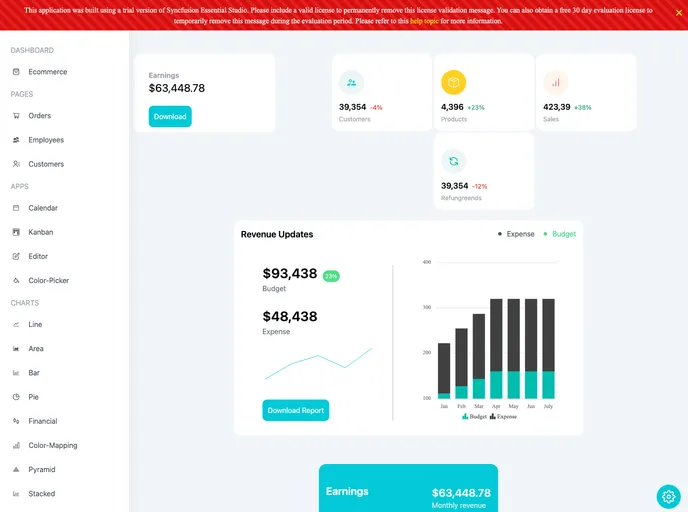


The React admin panel dashboard using React Hooks and functional components
Overview
This article provides an introduction to getting started with Create React App, a tool for bootstrapping React applications. It covers the available scripts for running, testing, and building the app, as well as advanced configuration options and deployment. The article also mentions the option to eject from Create React App if more customization is desired.
Features
- Easy Initialization: Create React App provides a streamlined way to initialize a new React project without the need for complex configuration settings.
- Development Server: The
npm startscript launches a development server, allowing developers to view and test their app in a browser while making changes. - Production Build: The
npm run buildscript builds the app for production, optimizing performance and generating a minified and hashed version ready for deployment. - Testing: The
npm testscript launches a test runner in watch mode, facilitating the development of reliable and testable React components. - Advanced Configuration: Create React App offers an option to customize the build tool and configuration choices through the
npm run ejectcommand, providing full control over dependencies and scripts.
Summary
Create React App is a powerful tool that simplifies the setup and development of React applications. With its easy initialization, convenient scripts for running and testing the app, and advanced configuration options, it allows developers to focus on building their app without worrying about complex setup or build processes. The option to eject from Create React App provides the flexibility to customize the configuration when needed.
- React
React is a widely used JavaScript library for building user interfaces and single-page applications. It follows a component-based architecture and uses a virtual DOM to efficiently update and render UI components
- Tailwind
Tailwind CSS is a utility-first CSS framework that provides pre-defined classes for building responsive and customizable user interfaces.
- Dashboard

A dashboard style website template is a pre-designed layout that features a user interface resembling a control panel or dashboard. It typically includes charts, graphs, tables, and other data visualization tools that allow users to monitor and analyze data in real-time.