
Pilipala
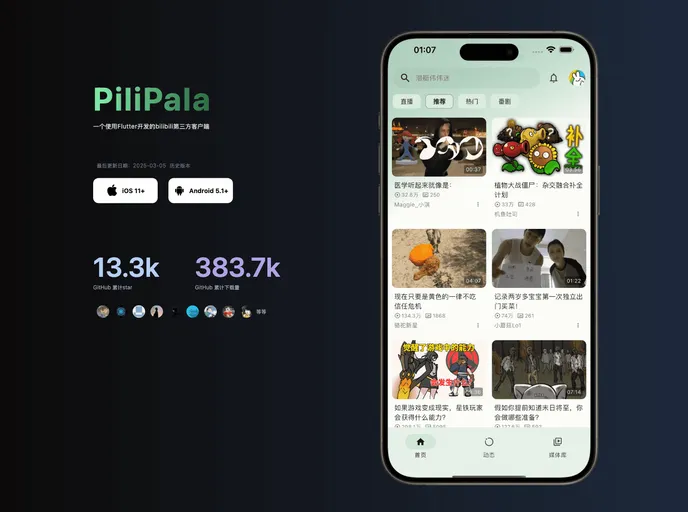

PiliPala 是使用Flutter开发的BiliBili第三方客户端,感谢使用。
Overview
PiliPala is a personal project developed for learning and testing purposes. It is an application for watching videos on the Bilibili platform. The project is focused on mobile platforms, specifically Android and iOS. It does not currently support desktop, tablet, or smartwatch devices.
Features
- 推荐视频列表(app端): Display a list of recommended videos on the app.
- 最热视频列表: Show a list of the most popular videos.
- 热门直播: Explore popular live streams.
- 番剧列表: Browse a list of anime shows.
- 屏蔽黑名单内用户视频: Block videos from users on the blacklist.
- 用户相关: View details about a user, including followers, following, and blocked users.
- 粉丝、关注用户、拉黑用户查看: Check followers, following users, and blocked users.
- 用户主页查看: View a user's profile page.
- 关注/取关用户: Follow or unfollow a user.
- 离线缓存: Download videos for offline viewing.
- 稍后再看: Save videos to watch later.
- 观看记录: Keep track of watched videos.
- 我的收藏: Access a collection of favorited videos.
- 动态相关: Interact with dynamic content.
- 全部、投稿、番剧分类查看: Browse dynamic content by various categories.
- 动态评论查看: Read comments on dynamic content.
- 动态评论回复功能: Reply to comments on dynamic content.
- 视频播放相关: Features related to video playback.
- 双击快进/快退: Double-tap to fast forward or rewind.
- 双击播放/暂停: Double-tap to play or pause.
- 垂直方向调节亮度/音量: Adjust brightness or volume by swiping vertically.
- 垂直方向上滑全屏、下滑退出全屏: Swipe up or down to enter or exit fullscreen mode.
- 水平方向手势快进/快退: Swipe horizontally to fast forward or rewind.
- 全屏方向设置: Set the orientation while in fullscreen mode.
- 倍速选择/长按2倍速: Choose playback speed or long-press for 2x speed.
- 硬件加速(视机型而定): Enable hardware acceleration for better performance (device-dependent).
- 画质选择(高清画质未解锁): Select video quality (HD quality may not be available).
- 音质选择(视视频而定): Choose audio quality (dependent on the video).
- 解码格式选择(视视频而定): Select decoding format (dependent on the video).
- 弹幕: Display danmaku (user-generated comments) on videos.
- 字幕: Show subtitles for videos.
- 记忆播放: Remember playback progress for videos.
- 视频比例:高度/宽度适应、填充、包含等: Adjust video aspect ratio to fit height/width, fill, or contain.
- 搜索相关: Search functionality.
- 热搜: Explore popular search queries.
- 搜索历史: View search history.
- 默认搜索词: Display default search terms.
- 投稿、番剧、直播间、用户搜索: Search for videos, anime, live streams, and users.
- 视频搜索排序、按时长筛选: Sort videos by relevance and filter by duration.
- 视频详情页相关: Features related to video details page.
- 视频选集(分p)切换: Switch between video episodes or parts.
- 点赞、投币、收藏/取消收藏: Like, give coins, and favorite/unfavorite videos.
- 相关视频查看: Explore related videos.
- 评论用户身份标识: Identify the role of users in comments.
- 评论(排序)查看、二楼评论查看: Read comments and view second-level comments.
- 主楼、二楼评论回复功能: Reply to comments on the main floor or second floor.
- 评论点赞: Like comments.
- 评论笔记图片查看、保存: View and save images in comments or notes.
- 设置相关: Settings features.
- 画质、音质、解码方式预设: Set presets for video quality, audio quality, and decoding format.
- 图片质量设定: Adjust image quality.
- 主题模式:亮色/暗色/跟随系统: Choose light or dark theme, or follow system theme.
- 震动反馈(可选): Enable haptic feedback (optional).
- 高帧率: Enable high frame rate.
- 自动全屏: Automatically enter fullscreen mode.
Summary
PiliPala is a personal project aimed at providing a video-watching experience on Bilibili for mobile platforms. It offers a wide range of features, such as browsing recommended videos, live streams, anime shows, and user profiles. Users can interact with the app by liking, commenting, and saving videos, as well as adjusting various settings for video playback. The project is currently focused on Android and iOS, with no support for desktop, tablet, or smartwatch devices. However, it is available for download and can be compiled from the source code.
- Flutter
Flutter is an open-source UI framework developed by Google that allows developers to create high-performance, cross-platform mobile applications with a single codebase.
- Material UI
material-ui adds classes to Tailwind CSS for all common UI components. Classes like btn, card, etc. This allows us to focus on important things instead of making basic elements for every project.