
Html2biblatex
A tiny bookmarklet for exporting web pages to BibLaTeX (all browsers / no installation).
Overview
Citing web pages in LaTeX can sometimes feel daunting, but with html2biblatex, this process has become remarkably straightforward. This lightweight bookmarklet provides an effortless way to export web pages directly to BibLaTeX, combining simplicity and effectiveness in a compact solution. Whether you are a student working on your thesis or a researcher compiling references, html2biblatex promises to make your referencing tasks much easier.
The magical functionality of this tool allows you to quickly compile citations from your favorite webpages, facilitating a more streamlined writing experience. With just a click, you can generate a BibLaTeX entry that fits seamlessly into your bibliography, ensuring your references remain organized and accurate.
Features
-
Lightweight Bookmarklet: Simply create a new bookmark in your browser, and you’re ready to go! No additional software installation required.
-
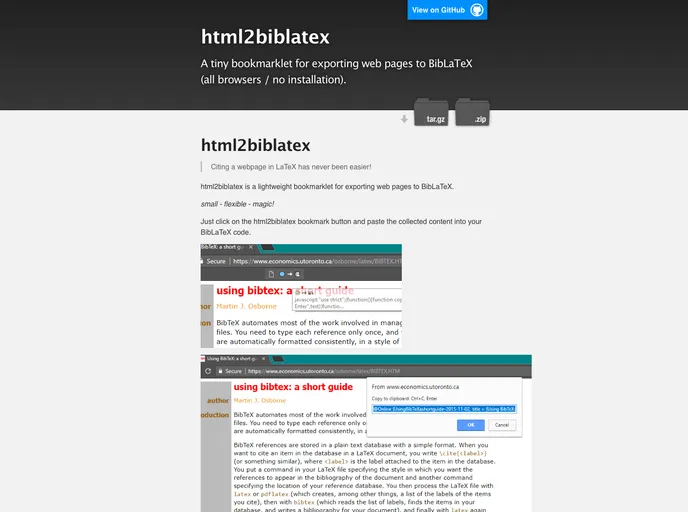
User-Friendly Interface: Clicking the bookmark captures your desired webpage and brings up an easy-to-use popup for copying the BibLaTeX entry.
-
Efficient Export Process: After clicking the bookmark, paste the selected content directly into your .bib file or import it into JabRef or Zotero for effortless citation management.
-
Cross-Browser Compatibility: Tested successfully on Google Chrome and Epiphany under Ubuntu, ensuring a wide range of usability across different platforms.
-
Immediate Access: As soon as you save the bookmark, you can cite any page you encounter—perfect for on-the-go researchers and writers.
-
Flexible and Adaptable: Rename your bookmark to anything that suits you, making it a personalized tool in your academic toolkit.
-
Developer Friendly: For those interested in building upon the tool, installation instructions for Node.js are provided, allowing for further customization and enhancements.