
React Admin Dashboard
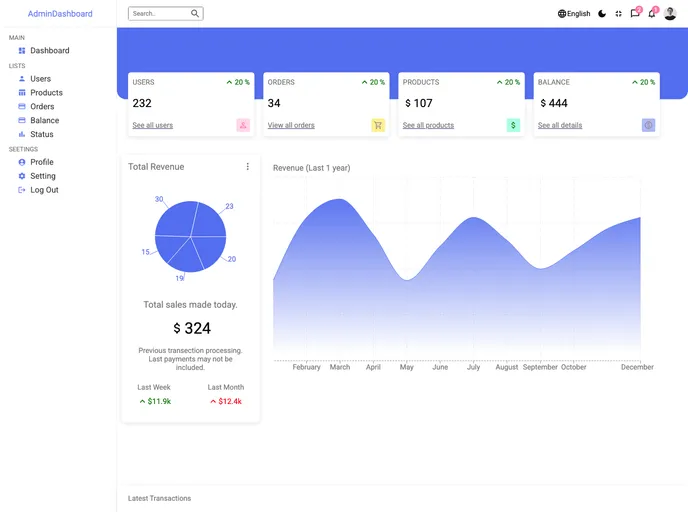



React.js Admin Dashboard. Content Management User Authorization and management. Security and Permissions . Viewing Data and editing. CRUD functionality or management. Dark & Light Mode. Client-side authentication & Image Upload
Overview
An admin dashboard is a valuable tool that provides professionals and teams with quick and easy access to important information. These dashboards offer a comprehensive overview of key data, reports, KPIs, and more. They allow users to dive deeper into the details when necessary.
Features
- Content Management: The admin dashboard allows for efficient management of content, making it easy to create, edit, and delete information.
- User Authorization and Management: Users can be assigned different roles and permissions, ensuring that only authorized individuals have access to certain features and data.
- Client-side Validation & Image Upload: This feature enables users to validate client-side input and easily upload images.
- Security and Permissions: The admin dashboard ensures the security of sensitive information and provides granular control over user permissions.
- Viewing Data and Editing: Users can effortlessly view and edit data directly from the dashboard, streamlining data management tasks.
- CRUD Functionality or Management: The dashboard includes functionality for creating, reading, updating, and deleting data, allowing for efficient data manipulation.
- Dark & Light Mode: Users can choose between a light and dark mode, based on their preference and the surrounding lighting conditions.
Summary
An admin dashboard is an essential tool for professionals and teams, providing easy access to important information and data management functionalities. With features like content management, user authorization, and dark/light mode, the dashboard offers a comprehensive solution for efficient data handling and visualization. The installation process is straightforward, allowing users to quickly set up and start benefiting from the admin dashboard.
- React
React is a widely used JavaScript library for building user interfaces and single-page applications. It follows a component-based architecture and uses a virtual DOM to efficiently update and render UI components
- SCSS
SCSS is a preprocessor scripting language that extends the capabilities of CSS by adding features such as variables, nesting, and mixins. It allows developers to write more efficient and maintainable CSS code, and helps to streamline the development process by reducing repetition and increasing reusability.
- Material UI
material-ui adds classes to Tailwind CSS for all common UI components. Classes like btn, card, etc. This allows us to focus on important things instead of making basic elements for every project.
- Dashboard

A dashboard style website template is a pre-designed layout that features a user interface resembling a control panel or dashboard. It typically includes charts, graphs, tables, and other data visualization tools that allow users to monitor and analyze data in real-time.
- Eslint

ESLint is a linter for JavaScript that analyzes code to detect and report on potential problems and errors, as well as enforce consistent code style and best practices, helping developers to write cleaner, more maintainable code.
- Recharts

Recharts is a powerful and easy-to-use React library for building customizable and interactive charts. Built on D3.js, it offers a wide range of pre-built chart types, such as line, bar, pie, and scatter charts, all of which can be composed with a declarative syntax.