My_portfolio
my portfolio
Overview
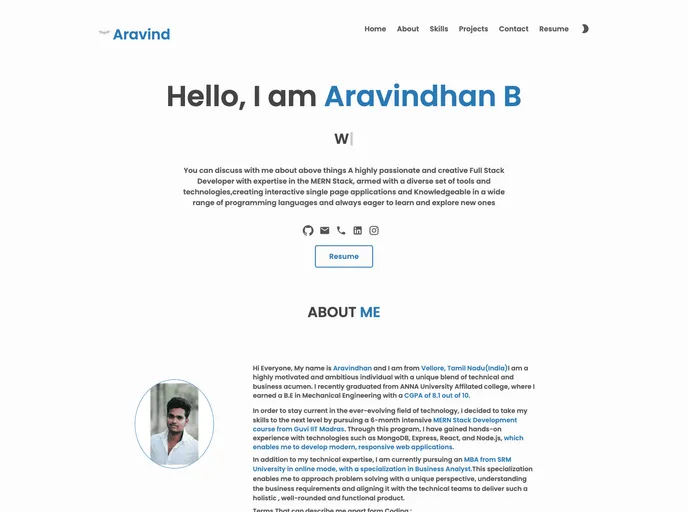
The portfolio by Aravindhan is a website that showcases his work and skills in a visually appealing and easily navigable manner. The website has been designed with a user-friendly interface, allowing visitors to explore his projects, experience, and contact details conveniently.
Features
- Modern and Minimalistic Design: The portfolio has a modern and minimalistic design, ensuring a clean and professional appearance that highlights the showcased projects effectively.
- Featured Projects: The website presents a selection of Aravindhan's key projects prominently on the home page, grabbing the attention of visitors and providing a glimpse into his expertise.
- Responsive Layout: The portfolio adopts a responsive layout, making it accessible and visually appealing on various devices, including desktops, tablets, and mobile phones.
To install the portfolio theme developed by Aravindhan, follow these steps:
- Download the theme files from the provided link: Portfolio Theme.
- Extract the downloaded file to your local directory.
- Open the extracted folder and locate the "index.html" file.
- Double-click on the "index.html" file to open it in your web browser.
Alternatively, you can also host the files on a web server and access them using a URL.
Summary
Aravindhan's portfolio showcases his work and skills in an aesthetically pleasing and easily accessible manner. With a modern and minimalistic design, the portfolio effectively highlights his projects and provides a glimpse into his expertise. The responsive layout ensures that visitors can explore his work seamlessly across different devices. The installation process is straightforward, allowing users to quickly set up the portfolio theme and customize it according to their needs.