E Commerce
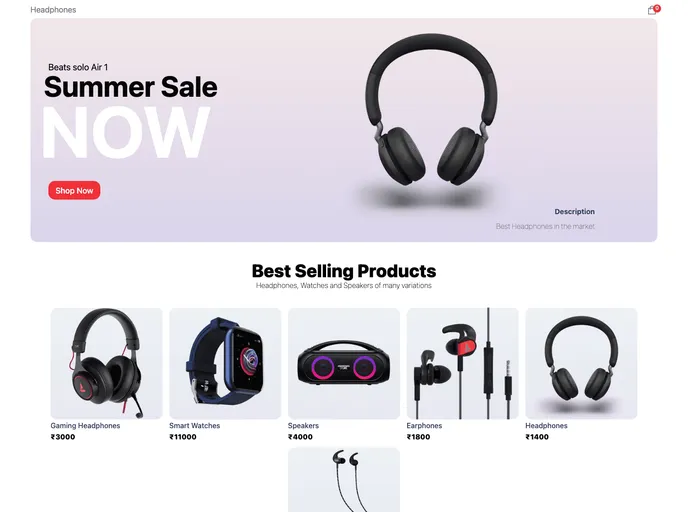
E-commerce
Overview:
This Next.js project is created using the create-next-app module. It is a development server that can be accessed on http://localhost:3000. The project structure allows for easy editing of pages and API routes. Next.js provides extensive documentation and tutorials to learn more about its features and API. The project can be deployed using the Vercel Platform.
Features:
- Next.js project: The project is built using Next.js, a JavaScript framework that enables server-side rendering and other optimizations.
- Development server: The project comes with a built-in development server that can be accessed on http://localhost:3000.
- Page editing: The pages of the project can be easily modified by editing the corresponding files, with the page automatically updating as changes are made.
- API routes: The project supports API routes, which can be accessed on http://localhost:3000/api/hello. The API route file can be found in the pages/api directory.
- Extensive documentation: Next.js provides comprehensive documentation that explains its features and API in detail.
- Interactive tutorials: Next.js offers an interactive tutorial called "Learn Next.js" to help users quickly get started with the framework.
- Vercel deployment: The project can be easily deployed using the Vercel Platform, which is recommended by the creators of Next.js.
Summary:
This Next.js project is created using the create-next-app module and comes with a built-in development server for easy testing and editing. It supports both page editing and API routes, making it suitable for building dynamic web applications. Next.js provides extensive documentation and tutorials for users to learn more about its features and API. The project can be easily deployed using the Vercel Platform, recommended by the creators of Next.js.